> For the complete documentation index, see [llms.txt](https://docs.guild.xyz/guild/llms.txt). Markdown versions of documentation pages are available by appending `.md` to page URLs; this page is available as [Markdown](https://docs.guild.xyz/guild/add-guild-roles.md).
# Add Guild roles
### Set up your first role
Roles are how you control who gets what in your community. Each role can have different requirements to join and different rewards.
#### Configure your default role
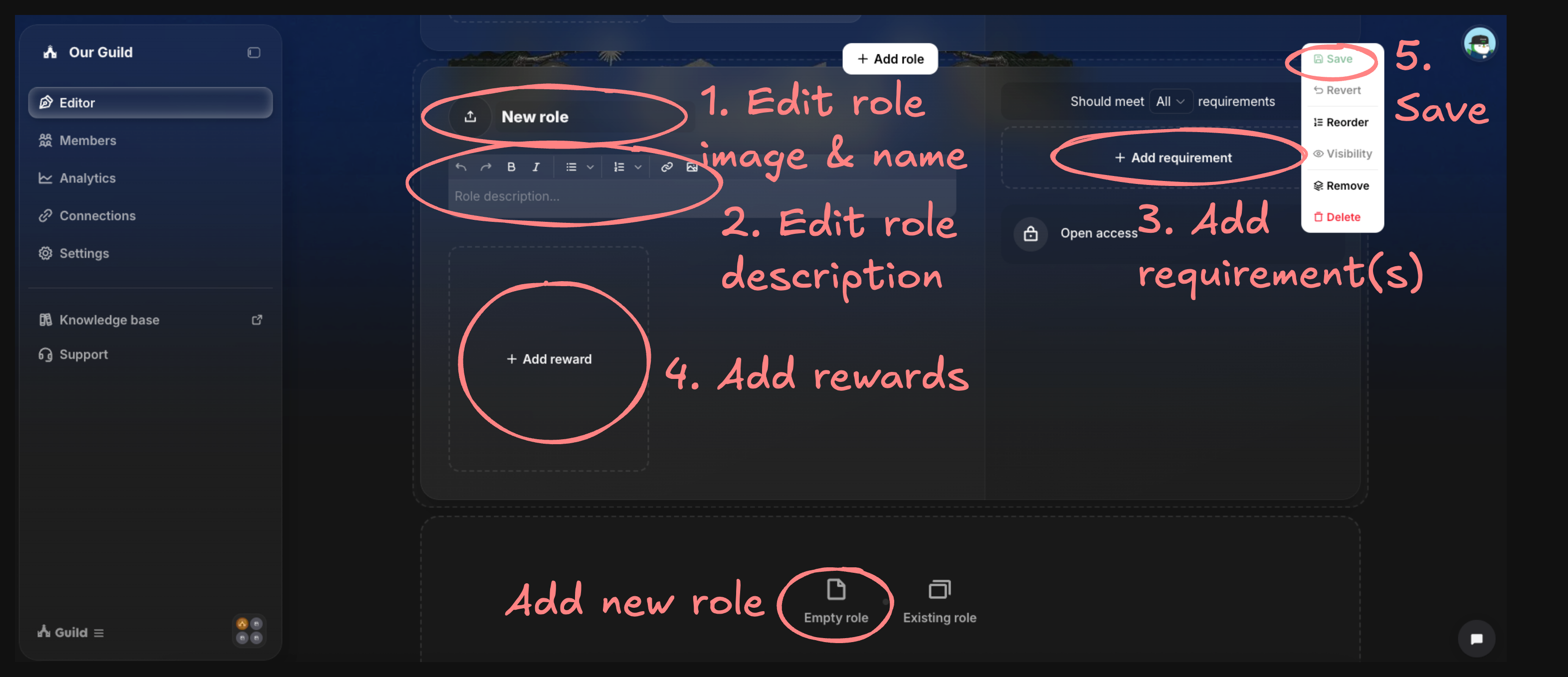
**1. Access the role editor**
* Go to the **"Editor"** tab in your admin dashboard
* You'll see a default role called "Member" - this is your community's starting point
**2. Make it yours**
* Upload a role image (128x128px works best)
* Edit the role title and description to explain what this role is about
* Keep it clear - this is often the first role people will see
**3. Set your requirements**
* Click **"Add requirements"** to control who can access this role
* Edit the requirement image and text, or keep the default settings
* Common first requirements: Follow on Twitter, join Discord, or hold a specific token
* Use **"Should not satisfy"** to exclude certain members
* Adjust **"Should meet..."** at the top to decide if members need all requirements or just some
**4. Add rewards**
* Click **"Add reward"** to give members something valuable
* Popular rewards: Discord roles, NFTs, and points
* Rewards activate automatically when members meet requirements
**5. Save and create more**
* Save your changes to activate the role
* Click **"Empty role"** below existing roles to create additional roles
{% hint style="info" %}
Most successful projects put their basic community roles - like Join Discord, Follow Twitter - on their home page, then create separate pages for campaigns or specialized subgroups like developers.
{% endhint %}
Edit roles
#### Test and go live
**Preview your work**
* Use **"View page as a visitor"** to experience what members will see
* Test that requirements work correctly and rewards claim properly
* Make sure your messaging is clear and the flow is simple
**Launch your community**
* Once everything looks good, your Guild URL is ready to share
Most projects begin with 2-5 key roles on their home page, then add membership tiers, quests, and specialized roles on new pages as their community grows.
---
# Agent Instructions
This documentation is published with GitBook. GitBook is the documentation platform designed so that both humans and AI agents can read, navigate, and reason over technical content effectively. Learn more at gitbook.com.
## Querying This Documentation
If you need additional information that is not directly available in this page, you can query the documentation dynamically by asking a question.
Perform an HTTP GET request on the current page URL with the `ask` query parameter, and the optional `goal` query parameter:
```
GET https://docs.guild.xyz/guild/add-guild-roles.md?ask=&goal=
```
`ask` is the immediate question: it should be specific, self-contained, and written in natural language.
`goal` is optional and describes the broader end goal you are ultimately trying to accomplish on behalf of the user. GitBook uses it to tailor the answer towards what is most useful for that goal.
The response will contain a direct answer to the question and relevant excerpts and sources from the documentation.
Use this mechanism when the answer is not explicitly present in the current page, you need clarification or additional context, or you want to retrieve related documentation sections.